Ashtanga yoga · guided practice
Ashtanga yoga app that counts breaths, not minutes
82 asanas, every breath counted
Ashtoga holds each pose for the number of breaths the sequence calls for, and you decide how long a breath lasts. Set it once and the whole primary series moves at your speed.
- Practices
- 5
- Asanas
- 82
- To begin
- free
What Ashtoga is
Ashtoga is an app for practicing Ashtanga yoga at home. It covers all five practices of the primary series: Surya Namaskara A and B, the fundamental positions, Yoga Chikitsa and the finishing sequence. That's 82 different poses over 489 steps, vinyasas included, and the app walks you through every one of them.
Practice
Work through the five practices in order
The Asanas tab lists all five. Open one to see every pose in it with its breath, where to look and which side it's on, then press play and Ashtoga runs it from the first pose to the last. When a practice ends, the app suggests what comes next.
- 01 11 asanas
Surya Namaskara A
Sun Salutation A
The warm-up. Eleven poses taking you from Samasthitih down to Adho Mukha Shvanasana and back again, a breath for each move. It's done five times over before anything else.
- 02 19 asanas
Surya Namaskara B
Sun Salutation B
The longer salutation. Utkatasana and Virabhadrasana A get folded in, which brings it up to nineteen poses, and three rounds of it follow the five of A.
- 03 11 asanas
Fundamental positions
Standing sequence
The standing postures that come after the salutations, from Padangusthasana to Parshvottanasana. Each is held for five breaths, and the app breathes you into and out of every one.
- 04 41 asanas
Yoga Chikitsa
Primary series
The last of the standing poses, then the seated series in full, from Dandasana through to Setu Bandhasana and Urdhva Dhanurasana, with a vinyasa between them. At forty-one poses it's easily the longest practice here.
- 05 16 asanas
Finishing sequence
Closing postures
The shoulderstand sequence, headstand, lotus and finally Shavasana. This is how a practice is meant to end.





Breathe
You decide how long a breath lasts
Ashtanga holds each pose for a set number of breaths, so that's what Ashtoga counts. Whether a breath takes two seconds or ten is up to you. Change it in App Settings and every practice adjusts to match.
- Inhale, exhale, or hold. The disc in the middle of the screen tells you which, so you don't have to remember.
- A voice in English or Sanskrit. It names each pose as you get to it, says which side you're on, and counts down the breaths of a hold, so you can practice with the screen face down. Or switch it off.
- Music and breathing sounds. A separate switch for each, and neither one touches the voice. The breathing sounds stretch to fit the breath length you've set.
- A countdown before the first pose. Anywhere from five seconds to a minute, which is enough to put the phone down and get on the mat.
five seconds in, five seconds out
the default breath length
Progress
The app keeps count, so you don't have to
Open Ashtoga and the first thing you see is how many days you've practiced. Underneath that are the hours you've put in, the breaths you've taken, how many of the 82 poses you've met so far, and your current streak. Today never breaks a streak, since the day isn't over yet.
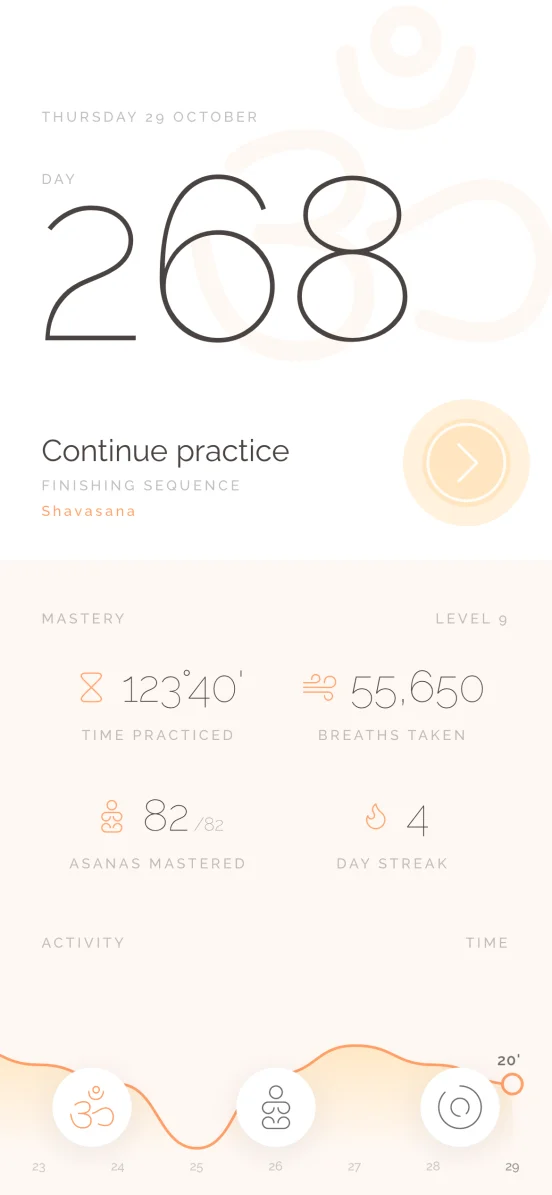
- 123°40'Time practiced
- 55,650Breaths taken
- 82/82Asanas mastered
- 4Day streak
A pose counts once you've held it in a timed practice. Further down you'll find your practice time across the week and a grid of the days you turned up. It's there for you to look at, and nobody else sees it.
Set a reminder for a time and the days you want it. Switching it off keeps the time, ready for when you want it back.
Ashtoga at a glance
| Practices | 5 — Surya Namaskara A and B, fundamental positions, Yoga Chikitsa, finishing sequence |
|---|---|
| Asanas | 82 poses, each drawn, named in Sanskrit and English, with its breath cue and gaze |
| Timing | In breaths. Breath length adjustable from 2 to 10 seconds |
| Countdown | 5 seconds to 1 minute before the first pose, or off |
| Gaze | The drishti for every pose, named and marked on the figure |
| Voice over | English, Sanskrit, or silent. Names each pose and its side, and counts holds down |
| Audio | Music and breathing sounds, each with its own switch. Breathing sounds last as long as your breath |
| Rounds | Five of Surya Namaskara A and three of B, then on to the next practice |
| Tracking | Days practiced, time, breaths taken, asanas mastered, day streak |
| Reminders | A time and a set of weekdays |
| Platforms | Android on Google Play. iOS coming soon |
FAQ
The questions we're asked most
The same answers you'll find inside the app.
What is Ashtoga?
Ashtoga is an app for practicing Ashtanga yoga at home. It covers the whole primary series, split into the five practices you work through in order: Surya Namaskara A, Surya Namaskara B, the fundamental positions, Yoga Chikitsa and the finishing sequence. Every pose is drawn and named, held for a set number of breaths, and the app counts those breaths out loud so you can keep your eyes closed.
What's in the app?
The Ashtanga primary series: 82 poses, each one drawn and named, arranged into five practices you work through in order. Ashtoga holds every pose for the right number of breaths and counts them for you.
How is a practice timed?
In breaths. Each pose lasts a set number of them, and you decide how long a breath is: anything from 2 to 10 seconds, under App Settings. Change it there and every practice adjusts to match.
Can I turn off the music or the voice?
Yes, all of it. Music, breathing sounds and the voice each have their own switch in App Settings. The voice can name the poses in English or in Sanskrit, or you can turn it off and practice in silence.
What does the voice say?
The name of each pose as you reach it, and the side when it's taken on one. When a pose is held, it says "Hold" and counts the breaths down. If a step has no Sanskrit name, the Sanskrit voice says it in English.
What is the countdown before a practice?
It's the gap between pressing play and the first pose, so you've got time to put the phone down and get on your mat. Set it anywhere from 5 seconds to a minute, or turn it off and start straight away.
Can I look up a pose without practicing?
Yes. Open a practice in the Asanas tab and you'll see every pose in it, in order, with both names, its breath, where to look and which side it's taken on. Tap one and the practice opens on that pose, with its one-line instruction. It's a good way to read through a sequence before you start it.
Does the app tell me where to look?
Yes. Each pose names its drishti, the point the eyes rest on, under the pose's name. Once you're in the pose, a small dot on the figure shows it instead. The last Shavasana just says eyes closed.
How many rounds of the sun salutations do I do?
Five of Surya Namaskara A and three of B. When a round ends the app offers the next one, and once you've done them all it offers the next practice. You can stop for the day at any point.
How does the day streak work?
It's the number of days in a row you've practiced. Today can't break it, since the day isn't over yet, so a streak only ends after a full day goes by without a practice.
What counts as a pose practiced?
Holding it in a timed practice. Once you've been through a pose in a session it counts toward your total, and the dashboard shows how many of the 82 you've reached.
How do I get a reminder to practice?
Go to Notifications, then Practice Reminders. Pick a time and the days of the week you want it, and the row will show you what's set. Switching it off cancels the reminder but remembers the time for next time.
Can I use my account on another device?
One device at a time. Signing in somewhere new signs you out of the old one, which keeps your practice history in a single place.
Is Ashtoga available on iPhone?
Not yet. Ashtoga is on Google Play for Android, and we're still working on the iPhone version. The App Store badge on this page turns into a link as soon as it's out.
Is Ashtoga suitable for beginners?
It works best once you've been taught the postures. Each pose comes with both names, a breath cue, its gaze and a one-line instruction, which is enough to follow a sequence you already know but not enough to learn alignment from scratch. If Ashtanga is new to you, find a teacher first and use the app to keep practicing between classes.